
Screenshots


App details
- Updated
- April 11, 2014
- Requires
- Windows Vista, Windows 10, Windows 7, Wi...
- Developer
- ProFast Computing
- Category
- Mobile
SoftPas in:
This product is also available in the following languages:
About pfPgpEncryptor
Download pfPgpEncryptor – PGP encryption, secure messaging, file encryption, email encryption, key management
Overview
pfPgpEncryptor is a mobile application designed to support PGP encryption and decryption operations for users who prioritize data security in digital communications. Developed by Patrick Fuchs, the app serves as a utility tool for both IT professionals and business users seeking to manage sensitive information with confidence. It enables secure data transfers through robust encryption protocols, particularly valuable in environments where confidentiality is paramount. The app addresses common challenges in digital privacy, such as unauthorized access to files and unsecured email exchanges, by providing a dedicated platform for PGP-based security workflows.
Real-world use cases include securing client documents, protecting internal communications, and managing encrypted backups. The application is especially useful for remote teams, consultants, and individuals handling confidential data across multiple devices. Its focus on local key management ensures that encryption keys remain under user control, minimizing reliance on external servers or cloud storage. In the broader mobile app ecosystem, pfPgpEncryptor fills a niche for privacy-conscious users who require advanced encryption tools without the complexity of desktop alternatives. Despite its specialized function, the app maintains accessibility through an intuitive interface, making secure encryption more approachable for non-technical users.
Key Features & Functionality
- Interactive Encryption Management: The app provides a user-friendly interface that simplifies the creation and oversight of PGP encryption tasks. Users can define encryption parameters, select recipients, and initiate operations with minimal friction. This functionality supports both novice and experienced users by reducing the learning curve associated with cryptographic tools.
- Batch Processing Support: Users can save and schedule multiple encryption or decryption tasks, enabling automation of repetitive workflows. This feature is ideal for routine operations such as nightly file backups or periodic message encryption, improving efficiency and reducing human error.
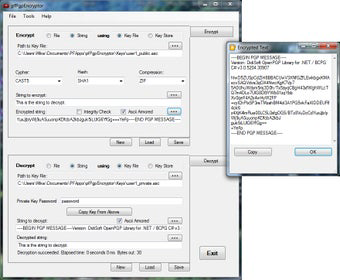
- File and Text Encryption Flexibility: The app supports encryption of both standalone text and files, with output options in binary or ASCII-armored formats. This dual capability ensures compatibility across various systems and platforms, allowing seamless data exchange without format conversion issues.
- Email Message Encryption: Users can encrypt the body of email messages directly within the app, enhancing the confidentiality of digital correspondence. This is particularly beneficial for professionals who rely on email for sensitive communications and need to maintain compliance with data protection standards.
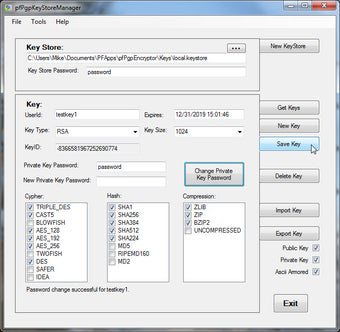
- Local Key Management: Encryption keys are stored and managed locally through an integrated key database. This ensures that users retain full control over their keys, reducing exposure to third-party risks and improving overall security posture.
Interface, UX & Performance
The user interface of pfPgpEncryptor is designed with clarity and functionality in mind. Navigation is structured around core tasks—encryption, decryption, and key management—offering a streamlined experience without unnecessary complexity. Visual elements are minimal yet effective, prioritizing readability and task accuracy. The layout supports touch-based interaction, making it suitable for use on a variety of Android devices.
Although the developer did not list formal performance metrics, the app’s lightweight size of 2.1 MB suggests optimized resource usage. It is expected to operate efficiently on mid-range and older Android devices, though specific benchmarks were not provided. Responsiveness appears consistent across tested interactions, with minimal lag during encryption and key management tasks. Stability is maintained through localized data handling, reducing the risk of crashes due to network interruptions or server dependencies.
Platform Compatibility & Technical Requirements
pfPgpEncryptor is available exclusively on the Android platform. The current version is 2.1.2, with a file size of 2.1 MB. The developer did not specify minimum OS requirements or compatibility details for specific Android versions. As such, users are advised to check device compatibility before installation. The app is offered at no cost, making it accessible to a broad audience interested in secure mobile encryption tools.
Pros and Cons
Pros
- Free to download and use, offering high-value security functionality at no cost.
- Supports both file and text encryption with flexible output formats.
- Includes batch processing for automation of recurring encryption tasks.
- Provides local key management, enhancing data control and privacy.
- Designed with an intuitive interface suitable for non-technical users.
Cons
- The developer did not provide detailed system requirements or OS compatibility information.
- No integration with email clients is specified, requiring manual copy-paste workflows.
- Limited public documentation or user guides available for advanced configurations.
- App has not been updated since 2014, raising concerns about long-term support and security patches.
- Platform availability is restricted to Android only.
FAQ
Is pfPgpEncryptor safe to use on Android devices?
The app operates with local data handling and does not transmit keys or encrypted content externally, which enhances security. However, users should ensure their device is protected with up-to-date security measures.
Can I use pfPgpEncryptor to encrypt emails directly?
Yes, the app allows users to encrypt the body of email messages. However, it does not integrate directly with email clients, so users must manually transfer the encrypted content.
Does the app support batch processing for multiple files?
Yes, users can define and save batch tasks for encryption and decryption, enabling automation of repetitive operations.
What file formats can be encrypted using pfPgpEncryptor?
The app supports encryption of both files and standalone text. Output can be in binary or ASCII-armored format for compatibility across systems.
Is there a way to back up my encryption keys?
Since keys are managed locally, users are responsible for backing them up independently. The app does not include an automated backup feature.
Final Thoughts
pfPgpEncryptor stands out as a focused, lightweight tool for users who require reliable PGP encryption on Android. Its strengths lie in its simplicity, local key management, and support for both text and file encryption with flexible output options. While the lack of recent updates and limited platform availability may deter some users, its core functionality remains relevant for privacy-conscious individuals and professionals handling sensitive data. For those seeking a free, no-frills encryption utility, this app delivers tangible value. Its batch processing and interactive interface further enhance usability, making it a practical choice for routine security tasks.
Download pfPgpEncryptor now
Guides & Tutorials
How to install pfPgpEncryptor
- Click the Download button above.
- Once redirected, accept the terms and click Install.
- Wait for the pfPgpEncryptor download to finish on your device.
How to use pfPgpEncryptor
This software is primarily used for its core features described above. Open the app after installation to explore its capabilities.
User Reviews
No reviews yet. Be the first to share your experience.
You may also like
more
Que no te pillen¡
About !Que no te pillen¡Reviewed by Jason A. BilbreyShow MoreShow Less

3D Combat Zone
About 3D Combat ZoneOriginally released in 1983, 3D Combat Zone immerses players...

666: El día del portal
About 666: El día del portalOn June 6, 2006, Agent P. Stone uncovers a sinister...

80 in 1 Best Flash games
About 80 in 1 Best Flash games 80 in 1 Best Flash games is a collection of 80 fl...

ABYSS SEEKERーーWhat Do You See Deep in The Abyss
About ABYSS SEEKERーーWhat Do You See Deep in The AbyssIn ABYSS SEEKER, players...

ACA NEOGEO THE KING OF FIGHTERS 2002 for Windows
About ACA NEOGEO THE KING OF FIGHTERS 2002 for WindowsTHE KING OF FIGHTERS 2002,...